
For many small and medium-sized businesses, the challenge is balancing good design with powerful e-commerce features without hiring a huge development team. That’s where Webflow e-commerce comes in.
What is Webflow?
Webflow is a no-code e-commerce platform that combines design freedom, a built-in CMS, and a reliable hosting system. It allows you to create custom product pages, build unique shopping experiences, and integrate with tools like Zapier, Stripe, PayPal, Google Analytics, and Facebook Pixel. In this guide, we’ll break down everything you need to know about Webflow e-commerce in 2025, from setup to advanced workflows.
Why Choose Webflow for E-Commerce?
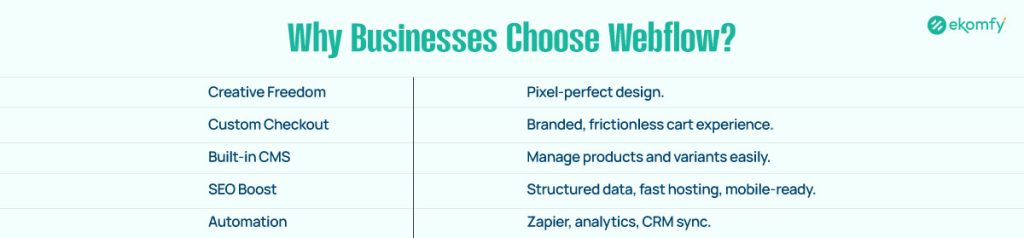
When you think of e-commerce platforms, Shopify, WooCommerce, or BigCommerce might come to mind. But Webflow is different. It is built for designers and business owners who want full creative control without touching complex code. Here’s why businesses are choosing Webflow for online stores:
Designer-Friendly Platform: Unlike Shopify or WooCommerce, Webflow offers total control over layouts using the Webflow Designer. You can create pixel-perfect designs and animations without needing a developer.
Custom Checkout & Cart: Instead of being stuck with rigid checkout pages, you can design a custom checkout flow that matches your brand.
CMS Collections for Products: Manage products, categories, and variants directly in Webflow CMS.
SEO Optimization in Webflow: Built-in tools for meta tags, alt text, structured data, and lightning-fast hosting give you a head start in ranking higher on Google.
Flexible Integrations: Webflow connects seamlessly with Stripe, PayPal, Zapier, Google Analytics, and Facebook Pixel, so you can run payments, automation, and tracking easily.
In short, Webflow gives you the creative freedom of a design tool like Figma combined with the power of an e-commerce platform.
Webflow E-Commerce Features You Need to Know
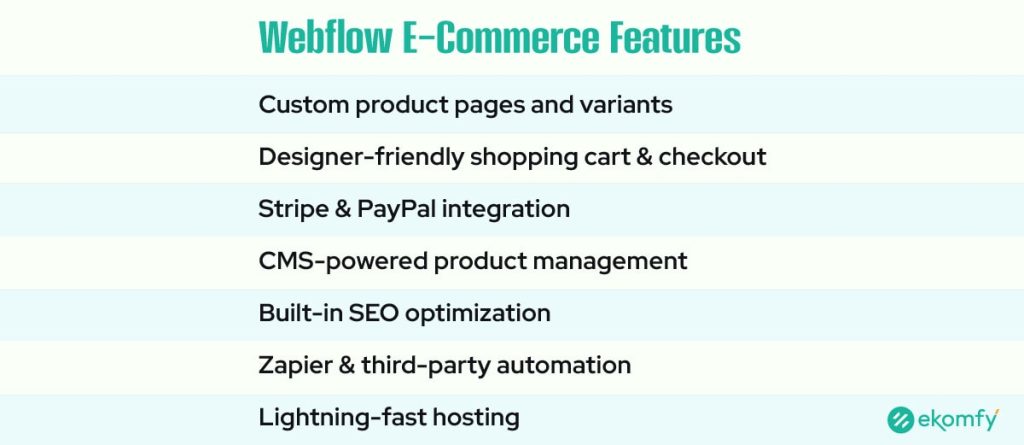
Here are the key Webflow e-commerce features. Know how to design product pages, customize carts, and manage checkout with ease.
Custom Product Pages & Variants
Your product page is where visitors decide whether to buy. Webflow makes it easy to create custom product pages with images, descriptions, reviews, and pricing. Using CMS Collections, you can set up multiple product variants (like size, color, or material) with dynamic fields.
Want to add animations? With advanced Webflow interactions, you can make product images zoom on hover or highlight “Add to Cart” buttons with motion effects. These small details improve the shopping experience and boost conversions.
Shopping Cart & Checkout
Unlike many platforms that force you into generic layouts, Webflow lets you design your shopping cart and checkout process your way. Want a side-drawer cart that slides out? Or a minimalist one-page checkout? With Webflow, it’s possible.
Custom checkout pages also reduce friction, helping you lower cart abandonment rates. And since checkout pages are hosted on Webflow, your customers get fast loading and secure transactions.
Payment Gateways & Integrations
Webflow comes with built-in support for Stripe and PayPal, which cover most global markets. But if you need more, you can use Zapier integrations or custom code to connect to other payment systems.
For marketing and tracking, Webflow supports Google Analytics, Facebook Pixel, and other third-party scripts. This makes it easier to track conversions, retarget customers, and improve your ad spend efficiency.
Webflow E-Commerce Templates & Store Setup
Learn how Webflow templates and setup work. Here are tools to help you launch faster, customize designs, and build your online store.
Webflow E-Commerce Templates
Starting from scratch can feel overwhelming. Luckily, Webflow has dozens of e-commerce templates built by professional designers. These templates are responsive, customizable, and optimized for various industries, including fashion, technology, food, health, and more.
For businesses working with design teams, you can also design your store in Figma and bring it directly into Webflow for implementation. This Figma-to-Webflow workflow saves time and ensures brand consistency.
Store Setup Guide
Setting up your Webflow store is straightforward:
- Create a Webflow account and choose an e-commerce plan.
- Pick a template or start from a blank canvas.
- Set up CMS Collections for products, categories, and variants.
- Design product pages using the Webflow Designer.
- Customize your checkout and cart.
- Integrate payment gateways (Stripe, PayPal) and enable taxes/shipping.
- Connect tracking tools like Google Analytics or Facebook Pixel.
- Publish your store with Webflow’s built-in hosting.
Within a few days, you can launch a professional store without writing a single line of code.
SEO Optimization in Webflow for E-Commerce
Getting a store online is only half the battle. You also need customers to find it. Thankfully, Webflow is strong in SEO performance.
Clean Code: Webflow generates lightweight, semantic code that loads fast.
SEO Settings: Each product page lets you add meta titles, descriptions, alt tags, and Open Graph data.
Site Speed: Hosting on Webflow’s Amazon Cloud infrastructure means fast loading worldwide.
Responsive Design: Built-in tools make sure your e-commerce site looks great on mobile, tablet, and desktop.
For e-commerce specifically, Webflow allows you to optimize category pages, product pages, and checkout pages with SEO best practices. Faster speed, better structure, and responsive layouts lead to higher Google rankings and conversions.
Webflow vs Shopify: Which One is Right for You?
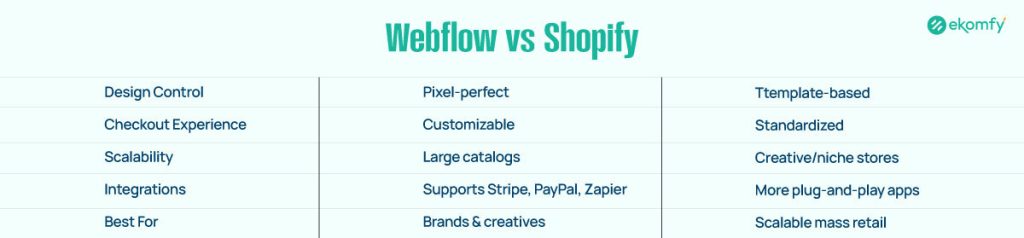
Both Webflow and Shopify are strong platforms, but they serve different needs.
Webflow: Best for businesses that value design flexibility and want a custom shopping experience. Ideal for brands, creative stores, and niche businesses.
Shopify: Best for businesses that need scalability, large product catalogs, and plug-and-play apps. Great for larger online stores.
If you’re comparing Webflow vs Shopify, ask yourself: Do I value creative freedom, or do I need a quick plug-and-play solution? Many businesses even use Webflow for the front-end store design and Shopify for backend inventory management, combining the best of both worlds.
Advanced Webflow E-Commerce Workflows
Here are the advanced workflows in Webflow for using Zapier, analytics, and headless CMS to automate tasks and grow sales.
Headless CMS with E-Commerce
In 2025, many brands are moving toward headless CMS setups, where the front-end (Webflow) and back-end (inventory systems, ERPs, CRMs) are separate but connected.
With Webflow CMS, Zapier, and custom APIs, you can push data from your Webflow store into other systems like CRM pipelines, inventory software, or automation platforms. This flexibility makes Webflow an option even for growing businesses.
Automation & Analytics
Automation saves time. By integrating Webflow with Zapier, you can:
- Send customer details directly into your CRM.
- Trigger emails when new orders arrive.
- Sync orders with Google Sheets for easy reporting.
For analytics, Webflow integrates smoothly with Google Analytics, Facebook Pixel, and GA4, helping you track performance, retarget ads, and improve ROI.
Future of Webflow E-Commerce in 2025
The future of Webflow e-commerce is bright. As no-code platforms continue to rise, Webflow’s flexibility makes it a strong choice for brands that want more than cookie-cutter templates.
We’ll see:
- More custom shopping experiences using animations and advanced interactions.
- Deeper integrations with tools like Zapier and CRM systems.
- Better support for global payments and shipping.
- Continued growth of designer-friendly e-commerce hosting.
For businesses in 2025, Webflow represents a balance between creativity and functionality, giving small businesses the tools to compete with enterprise-level stores.
Conclusion
Webflow e-commerce is shaping the future of online stores in 2025. It blends design freedom, no-code development, and advanced integrations into one powerful platform. Whether you’re launching your first store or upgrading from another platform, Webflow gives you everything you need to build, design, and scale your online business.
If you’re ready to create a Webflow online store with custom checkout design, SEO optimization, and powerful integrations, now is the time to explore what Webflow can do.
FAQs About Webflow E-Commerce
Can Webflow handle large e-commerce stores?
Yes. Webflow can support a wide range of e-commerce stores using CMS Collections, custom product pages, and integrations. However, if your store has thousands of products and advanced inventory needs, Shopify or a hybrid solution may be more suitable.
Which payment gateways does Webflow support?
Webflow natively supports Stripe and PayPal, covering most global markets. With Zapier integrations or custom code, you can connect additional gateways, making it possible to accept payments worldwide while keeping your checkout process secure.
Is Webflow better than Shopify?
Webflow is best for brands that need full design control, custom checkout flows, and unique shopping experiences. Shopify is stronger for larger stores needing scalability, advanced inventory management, and a wide app ecosystem. Your choice depends on goals.
Can I integrate analytics and tracking in Webflow?
Yes. Webflow allows you to add Google Analytics, GA4, Facebook Pixel, and other third-party tracking scripts. These tools let you monitor user behavior, track conversions, and run retargeting ads, giving you insights to boost sales and optimize campaigns.
Do I need coding knowledge for Webflow e-commerce?
No. Webflow is designed as a no-code platform, meaning you can build and manage your store without technical skills. However, developers can use custom code snippets, APIs, or Zapier automations to extend functionality, giving advanced users more flexibility.