
Running an ecommerce store is not a one-time setup. Launching your store is only the beginning. To keep sales steady, protect customer data, and stay visible in search engines, monthly ecommerce maintenance is essential.
Many store owners focus heavily on marketing and ads but ignore regular ecommerce maintenance tasks. Over time, this leads to slow site speed, broken pages, security risks, SEO drops, and poor user experience. A well-maintained ecommerce website performs better, converts more visitors, and builds long-term trust.
This guide explains the top 10 ecommerce maintenance tasks every store must do monthly, written in simple language so any store owner can follow it. Whether you run a small Shopify store or a large WooCommerce website, these tasks apply to every ecommerce business.
What is Ecommerce Website Maintenance?
Ecommerce website maintenance is the ongoing technical practice of keeping an online store updated, secure, and optimized. It involves regular tasks such as security scanning, software updating, database optimization, and content verification to ensure a seamless shopping experience and prevent revenue loss due to downtime or cyber threats.
The Monthly Ecommerce Maintenance Checklist
| Task Category | Action Item | Frequency | Criticality |
| Security | Malware Scan & SSL Check | Weekly/Monthly | High |
| Data Safety | Full Website Backup (Files + DB) | Weekly/Monthly | High |
| Performance | Core Web Vitals & Speed Test | Monthly | Medium |
| Software | Update Plugins, Themes, & CMS | Monthly | High |
| UX/UI | Broken Link Audit (404s) | Monthly | Medium |
| Revenue | Checkout Process Testing | Monthly | Critical |
| Inventory | Stock Accuracy Review | Monthly | Medium |
| Mobile | Responsive Design Check | Monthly | High |
| Strategy | Analytics & Traffic Review | Monthly | Low |
| Leads | Contact Form & CTA Testing | Monthly | Medium |
Why Consistency is King in Online Retail Store
Imagine owning a brick-and-mortar store and never sweeping the floors, changing the burnt-out lightbulbs, or checking if the front door lock actually works. Customers would eventually stop coming in. Your digital storefront is no different.
In the fast-paced world of online retail, neglecting your site leads to slow loading times, security vulnerabilities, and broken checkout flows. For store owners on platforms like Shopify, WooCommerce, or Magento, the technical health of your site is directly tied to your conversion rate.
1. Perform a Deep Security Scan and Malware Check
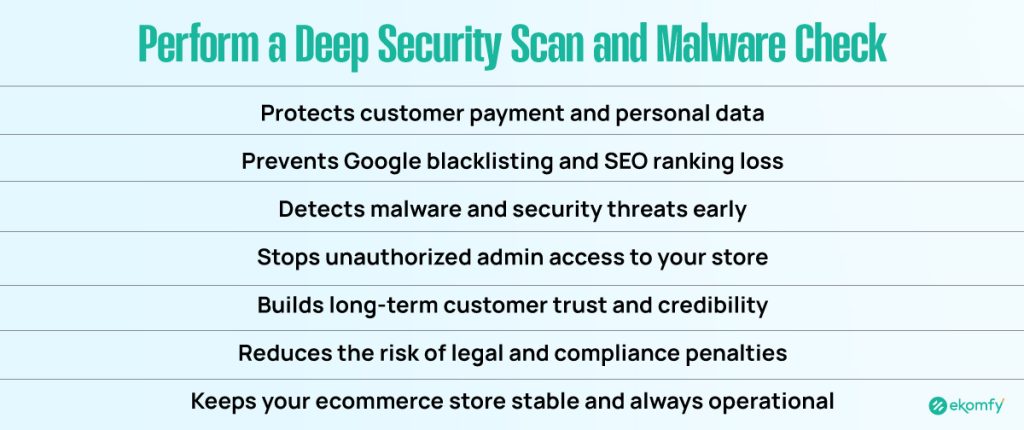
Security is the bedrock of trust in ecommerce. If your customers don’t feel safe entering their credit card information, you don’t have a business. Cyber threats evolve daily, and ecommerce stores are prime targets for data breaches and malware injections.
Why it matters: A hacked site can result in your domain being blacklisted by Google, immediate loss of customer trust, and severe legal penalties. Search engines prioritize secure sites (HTTPS), and any sign of malware will tank your rankings instantly.
How to do it:
- Run Automated Scans: Use tools like Sucuri or Wordfence (specifically for WordPress/WooCommerce) to scan for malware.
- Check SSL Certificates: Ensure your SSL certificate is active. A valid SSL ensures that data between your customer’s browser and your server is encrypted.
- Review Admin Access: Audit user accounts. Hackers often create “ghost” admin accounts to maintain access.
- Enforce 2FA: Ensure all staff members with backend access use Two-Factor Authentication.
2. Execute and Verify Full Website Backups
You might think your hosting provider has you covered, but relying on a single point of failure is risky. Data backups are your insurance policy against catastrophic failure, such as botched updates or malicious attacks.
Why it matters: Without a clean, recent backup, you could lose weeks of product data or order history.
How to do it:
- The 3-2-1 Rule: Keep three copies of your data, on two different media types, with one copy off-site (e.g., cloud storage).
- Database vs. Files: Ensure you back up both website files (themes, images) and the SQL database (customer data, orders).
- Test the Restore: Critical Step. Once a month, attempt to restore a backup to a staging environment to prove the files are not corrupted.
3. Test and Optimize Page Speed (Core Web Vitals)
User patience is at an all-time low. Google’s Core Web Vitals update has made page experience a direct ranking factor.
Why it matters: Page loading speed directly impacts your bounce rate. If your site takes more than 3 seconds to load, conversion rates drop significantly.
How to do it:
- Run Speed Tests: Use Google PageSpeed Insights or GTmetrix. Test product pages, not just the homepage.
- Image Compression: Use tools like TinyPNG or Smush to compress high-resolution product images.
- Cache Management: Clear server and browser caches to ensure customers see the latest version of your site.
4. Update Plugins, Themes, and CMS
Software is never finished; it is only updated. Whether you use WooCommerce (Open Source) or Shopify (SaaS), keeping software current is vital.
Why it matters: Outdated plugins are the #1 entry point for hackers. Updates often contain security patches that close these backdoors.
How to do it:
- Staging First: Never update on a live site. Use a staging environment to test for conflicts.
- Platform Specifics:
- WooCommerce: Update the WordPress core, the WooCommerce plugin, and all extensions.
- Shopify: Check installed Apps for updates and review theme file changes.
- Magento: Apply security patches provided by Adobe.
- Remove Unused Extensions: Delete dormant plugins to reduce bloat and security risks.
5. Audit for Broken Links and 404 Errors
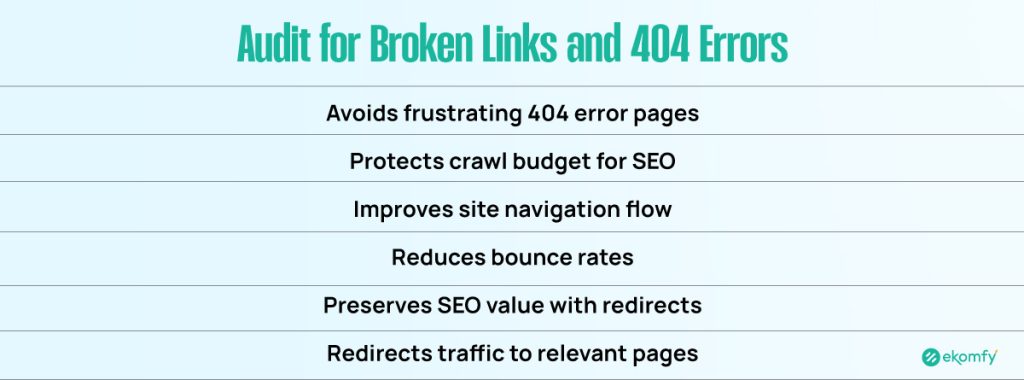
Broken links occur naturally as you delete products or change categories. A “404 Page Not Found” error disrupts the user journey.
Why it matters: Broken links waste your crawl budget (the resources search bots use to index your site) and frustrate users, leading to higher bounce rates.
How to do it:
- Crawl Your Site: Use Screaming Frog or Ahrefs to identify 404 errors.
- 301 Redirects: Set up 301 redirects for discontinued products, pointing them to a relevant category page rather than the homepage.
6. Comprehensive Checkout Process Testing
Checkout functionality is the single most critical touchpoint of your ecommerce store.
Why it matters: Glitches here—like shipping calculators failing or payment gateways timing out—are silent revenue killers.
How to do it:
- Simulate a Purchase: Go through the entire flow: Add to Cart > Address > Payment.
- Test Gateways: Verify Stripe, PayPal, and Apple Pay connections. Use “sandbox mode” for testing.
- Guest Checkout: Ensure users can buy without creating an account if that is your policy.
7. Inventory Accuracy and Product Information Review
Inventory management sync errors can lead to overselling (selling items you don’t actually have).
Why it matters: Overselling results in refunds, negative reviews, and customer service disputes.
How to do it:
- Spot Check: Physically count high-velocity SKUs and compare with backend numbers.
- Product Updates: Verify that pricing, images, and specifications are current.
- Stock Status: Ensure “Out of Stock” labels display correctly to manage customer expectations.
8. Mobile Responsiveness and UI/UX Check
With over 60% of traffic coming from mobile, mobile responsiveness is non-negotiable.
Why it matters: Google uses mobile-first indexing. If your mobile site is broken, your SEO ranking suffers across all devices.
How to do it:
- Device Testing: Use browser developer tools or BrowserStack to emulate iPhones, Samsungs, and tablets.
- Touch Targets: Ensure “Add to Cart” buttons are easily clickable with a thumb.
- Pop-up Check: Verify that newsletter pop-ups do not block essential navigation on small screens.
9. Analyze Analytics and Performance Reports
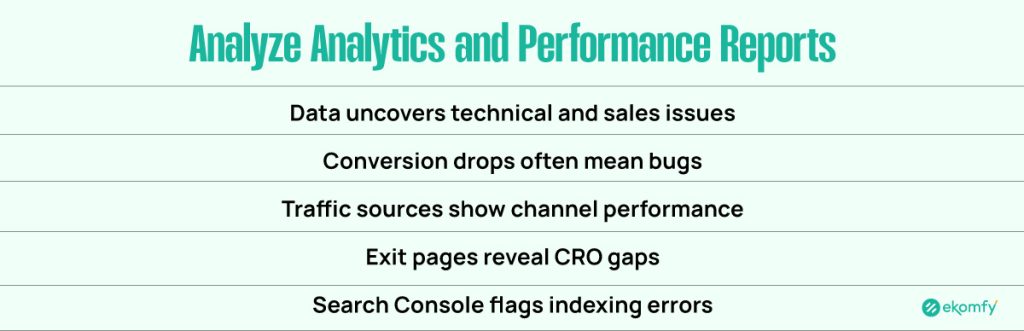
Data is the voice of your customer. Ecommerce analytics help you spot technical issues and sales trends.
Why it matters: A sudden drop in conversion rate on a specific browser (e.g., Safari) usually indicates a technical bug rather than a marketing failure.
How to do it:
- Traffic Sources: Review Google Analytics 4 (GA4) for organic vs. paid traffic trends.
- Exit Pages: Identify pages with high exit rates and optimize them for Conversion Rate Optimization (CRO).
- Search Console: Check Google Search Console for indexing errors.
10. Test All Forms and Calls-to-Action (CTAs)
Your contact forms and newsletter signups are vital for lead generation and support.
Why it matters: A broken contact form can lead to chargebacks if customers cannot reach you for returns.
How to do it:
- Manual Submission: Fill out every form on the site to ensure it submits correctly.
- Deliverability: Check that notification emails land in your inbox, not the spam folder.
Comparison: DIY Maintenance vs. Agency Support
Should you handle maintenance yourself or hire an expert?
| Feature | DIY (Do It Yourself) | Professional Agency (Ekomfy) |
| Cost | Low (Time-intensive) | Monthly Retainer |
| Expertise | Generalist | Specialized (Code, UX, SEO) |
| Response Time | Variable | Guaranteed SLAs |
| Risk | High (Accidental breakage) | Low (Staging sites & backups) |
| Tools | Free/Basic versions | Enterprise-grade tools |
| Best For | Hobbyists / New Stores | Scaling & Enterprise Stores |
Ekomfy – Your Ecommerce Maintenance Partner
At Ekomfy, we help ecommerce businesses stay fast, secure, and profitable through professional monthly ecommerce maintenance services.
Our team handles everything from performance optimization and security monitoring to ecommerce SEO and UX improvements. Instead of worrying about technical issues, you can focus on growing your business.
Visit our website today and sign up to get expert ecommerce maintenance support tailored to your store’s needs.
Final Thoughts
Monthly ecommerce maintenance is not optional. It is essential for long-term success. Stores that maintain performance, security, SEO, and user experience consistently outperform those that don’t.
By following these top 10 ecommerce maintenance tasks, you protect your store, improve conversions, and build customer trust month after month.
Frequently Asked Questions (FAQ)
1. What is the difference between Shopify and WooCommerce maintenance?
– Shopify maintenance focuses on app compatibility, theme updates, and frontend optimization, as the hosting is managed by Shopify. WooCommerce maintenance is more intensive, requiring server management, PHP updates, and manual security patches because it is an open-source platform.
2. How much does ecommerce website maintenance cost?
– Costs vary by store size. DIY maintenance is “free” but costs time. Freelancers may charge $50-$100/hr. Professional agencies like Ekomfy typically offer monthly retainer packages ensuring dedicated support and fixed costs.
3. Why is my ecommerce site running slow?
– Common causes include unoptimized images, too many plugins/apps, poor hosting server response time, or a lack of caching. A Core Web Vitals audit can pinpoint the exact cause.
4. How often should I backup my online store?
– At a minimum, perform a full backup weekly. However, for high-volume stores, daily or real-time backups are recommended to prevent data loss from new orders.
5. Does website maintenance impact SEO?
– Yes. Google prioritizes sites that are secure (HTTPS), fast (Core Web Vitals), and error-free (no 404s). Regular maintenance is essential for maintaining and improving your SEO rankings.